因为家里的原因需要一个报价平台 自己用
但是试了好几款oa系统 都达不到自己想要的效果
用Thinkphp来写的话也是可以做到的 但是我这个人懒
还是先用博客程序带代替一下吧 好了进入正题 我一边操作一边记录
# 准备工作
* 一台干净的VPS
* 可以联网使用的电脑或者手机
* 脑子+眼睛
----------
##第一步连接ssh
`ssh root@you service ip`
然后就是输入密码 unix貌似输密码的时候都是隐藏的直接输入就好
`root@yeshu:~# passwd`
----------
##第二步部署环境
别人是怎样部署的我不知道 反正我用我自己的办法来做 各有所需 各又有不同吧
首先安装BT面板 我是用的是ubuntu所以脚本是ubuntu的 系统不同脚本也不同
需要的自己去[宝塔面板官网][1]找适合自己的脚本
`wget -O install.sh http://download.bt.cn/install/install-ubuntu.sh && bash install.sh`
安装完后会有如下信息反馈 后台地址账号密码
==================================================================
Congratulations! Install succeeded!
==================================================================
Bt-Panel: http://you service ip:8888
username: admin
password: xxxxxx
Warning:
If you cannot access the panel,
release the following port (8888|888|80|443|20|21) in the security group
==================================================================
Time consumed: 3 Minute!
然后进入宝塔面板后台安装一个nginx
我是用宝塔面板主要是因为文件管理方便 老连接ftp操作太麻烦
然后面板暂时略过进入下一步
----------
####安装依赖
由于是新装的系统 我们需要先update下 然后在安装依赖
apt-get update && apt-get upgrade
apt-get install apt-transport-https sqlite3
到此依赖就差不多了 因为系统原因 不一定我写出的就是完整的依赖 其他的自个儿琢磨下就行了
----------
#### 安装 Node.js
这里以安装 Node.js V6 LTS 为例,目前 V8 还不被 Ghost 支持因为还没进入 TLS 周期。
curl -sL https://deb.nodesource.com/setup_6.x | bash -
apt-get install nodejs
安装 Yarn
yarn 和 npm 一样是node.js的依赖安装软件,但是更加快速、安全和可靠。
curl -sS https://dl.yarnpkg.com/debian/pubkey.gpg | sudo apt-key add -
echo "deb https://dl.yarnpkg.com/debian/ stable main" | tee /etc/apt/sources.list.d/yarn.list
apt-get update && apt-get install yarn
使用淘宝源
无论是 yarn 还是 npm 的软件源都是在国外的,所以下载速度龟速或者根本下不动,好在淘宝有提供加速,可以让国内的服务器也加速体验。
Npm使用淘宝源:
npm --registry https://registry.npm.taobao.org info underscore
Yarn使用淘宝源:
yarn config set registry https://registry.npm.taobao.org
####Ghost-cli
安装 Ghost-cli:
npm install -g ghost-cli --registry=https://registry.npm.taobao.org
去宝塔面板添加域名 为的是存放 Ghost 文件
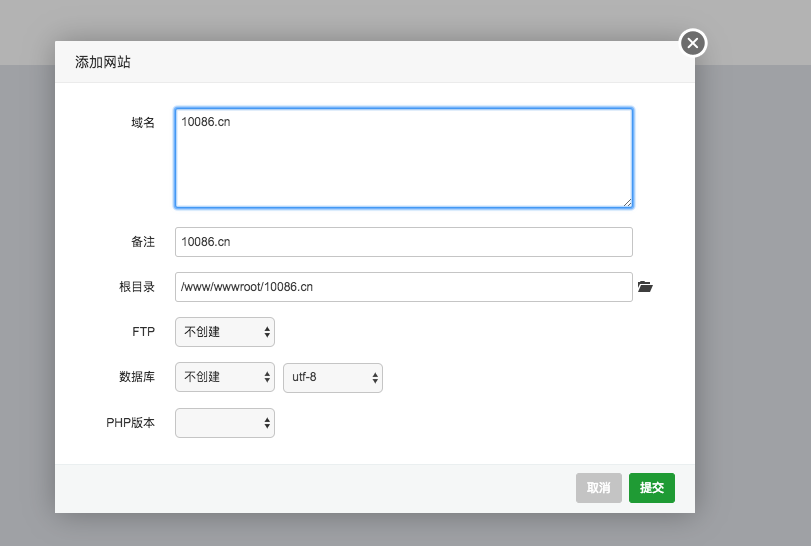
然后在终端cd道你刚刚绑定的域名目录
例子:
cd /www/wwwroot/10086.cn
##安装 Ghost
由于我没有安装mysql 所以我使用sqlite3作为数据库
ghost install --db=sqlite3
嗯!!然后这里遇到问题了 莫名其妙提示文件夹不是空的 无法安装
好吧 你赢了 我直接用脚本!!!
https://git.io/ghost-nginx-naxsi -O ghost-nginx-naxsi.sh
sudo bash ghost-nginx-naxsi.sh xxx.com
[1]: http://www.bt.cn/